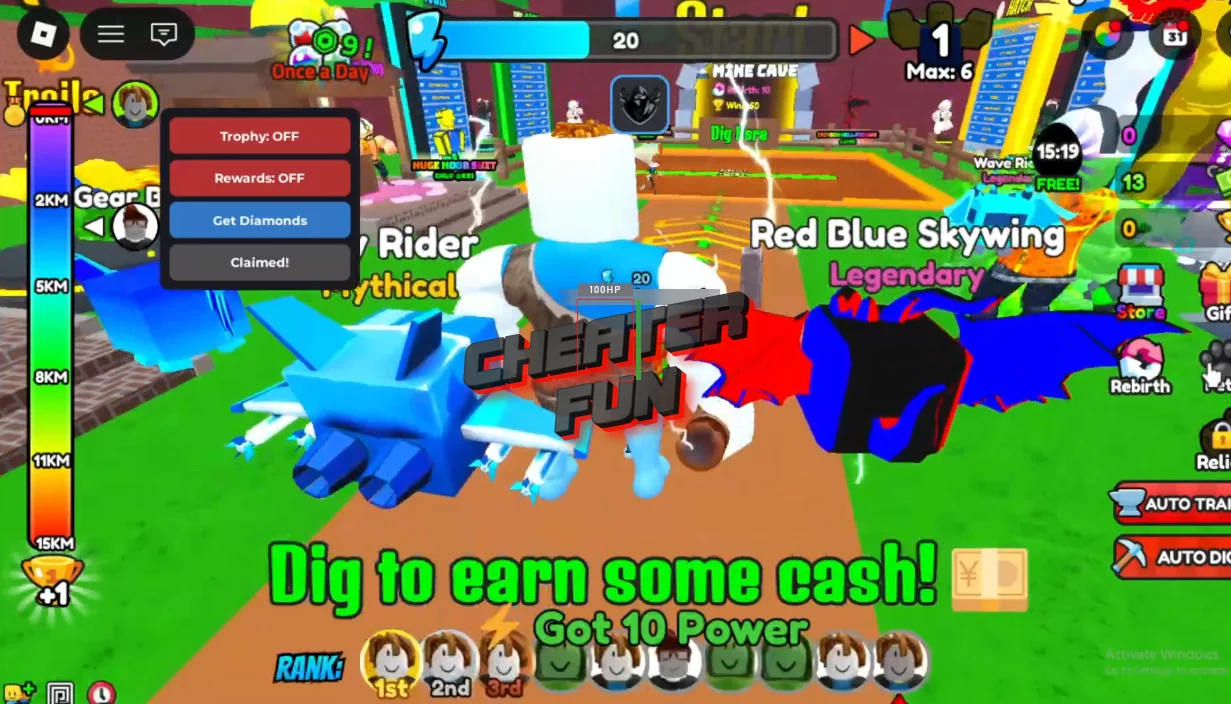
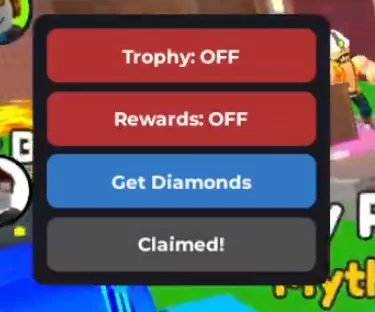
You can get a new script for the new Dig Legends game from the world of Roblox on this page. It is a simple script with a convenient GUI where you can find features such as Inf Diamonds, Inf Trophy, Inf Rewards, and use these features to improve your gameplay and help your friends. At the moment, this is the best script for Dig Legends that you can run without a key and without getting banned. It works without any problems on PC and Mobile. The main thing is to run it correctly, and everything will work perfectly.
This no-key GUI script supercharges progression in Dig Legends, removing grind from the digging journey. With Infinite Diamonds, Infinite Trophies, and Infinite Rewards, you can upgrade power, unlock top-tier pickaxes and gear, and push for the #1 digger spot effortlessly. Perfect for fast growth, competitive players, and anyone who wants to focus on treasure hunting instead of farming.
Dig Legends Script - Inf Wins, Get All Codes, Fast Dig
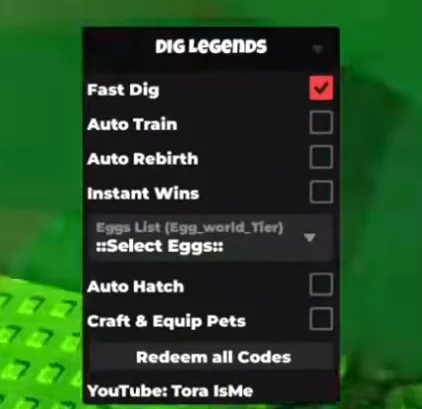
loadstring(game:HttpGet("https://raw.githubusercontent.com/gumanba/Scripts/refs/heads/main/DigLegends", true))()Dig Legends Script GUI (NO KEY) - Inf Diamonds, Inf Trophy, Inf Rewards
local RS = game:GetService("ReplicatedStorage")
local UIS = game:GetService("UserInputService")
local player = game.Players.LocalPlayer
local knit = RS.Packages._Index["[email protected]"].knit.Services

local trophy, rewards = false, false

local gui = Instance.new("ScreenGui", gethui and gethui() or player.PlayerGui)
gui.Name = "Exploits"

local frame = Instance.new("Frame", gui)
frame.AnchorPoint = Vector2.new(0.5, 0.5)
frame.Position = UDim2.new(0.5, 0, 0.5, 0)
frame.BackgroundColor3 = Color3.fromRGB(25, 25, 35)
frame.AutomaticSize = Enum.AutomaticSize.XY
Instance.new("UICorner", frame).CornerRadius = UDim.new(0, 8)

local layout = Instance.new("UIListLayout", frame)
layout.Padding = UDim.new(0, 5)
layout.HorizontalAlignment = Enum.HorizontalAlignment.Center

local pad = Instance.new("UIPadding", frame)
pad.PaddingTop = UDim.new(0, 8)
pad.PaddingBottom = UDim.new(0, 8)
pad.PaddingLeft = UDim.new(0, 8)
pad.PaddingRight = UDim.new(0, 8)

local function btn(txt, color)
    local b = Instance.new("TextButton", frame)
    b.Size = UDim2.new(0, 150, 0, 30)
    b.BackgroundColor3 = color
    b.Text = txt
    b.TextColor3 = Color3.new(1, 1, 1)
    b.Font = Enum.Font.GothamBold
    b.TextSize = 12
    Instance.new("UICorner", b).CornerRadius = UDim.new(0, 6)
    return b
end

local tBtn = btn("Trophy: OFF", Color3.fromRGB(180, 50, 50))
tBtn.MouseButton1Click:Connect(function()
    trophy = not trophy
    tBtn.Text = trophy and "Trophy: ON" or "Trophy: OFF"
    tBtn.BackgroundColor3 = trophy and Color3.fromRGB(50, 180, 50) or Color3.fromRGB(180, 50, 50)
    while trophy do
        pcall(function() knit.FightService.RE.GetTrophyEvent:FireServer() end)
        task.wait(0.1)
    end
end)

local rBtn = btn("Rewards: OFF", Color3.fromRGB(180, 50, 50))
rBtn.MouseButton1Click:Connect(function()
    rewards = not rewards
    rBtn.Text = rewards and "Rewards: ON" or "Rewards: OFF"
    rBtn.BackgroundColor3 = rewards and Color3.fromRGB(100, 50, 180) or Color3.fromRGB(180, 50, 50)
    while rewards do
        pcall(function() knit.OnlineRewardService.RE.ResetOnlineRewards:FireServer() end)
        for i = 1, 15 do pcall(function() knit.OnlineRewardService.RE.ClaimOnlineReward:FireServer(i) end) end
        task.wait(0.5)
    end
end)

local dBtn = btn("Get Diamonds", Color3.fromRGB(50, 120, 200))
dBtn.MouseButton1Click:Connect(function()
    pcall(function() knit.RandomPotionService.RE.BuyPotionEvent:FireServer(-9e308) end)
    dBtn.Text = "Done!"
    task.wait(1)
    dBtn.Text = "Get Diamonds"
end)

local sBtn = btn("Starter Pack", Color3.fromRGB(200, 130, 50))
sBtn.MouseButton1Click:Connect(function()
    pcall(function() knit.OnlineRewardService.RF.ClaimStarterPack:InvokeServer() end)
    sBtn.Text = "Claimed!"
    sBtn.BackgroundColor3 = Color3.fromRGB(80, 80, 80)
end)

local drag, start, pos = false, nil, nil
frame.InputBegan:Connect(function(i)
    if i.UserInputType == Enum.UserInputType.MouseButton1 then
        drag, start, pos = true, i.Position, frame.Position
    end
end)
UIS.InputEnded:Connect(function(i)
    if i.UserInputType == Enum.UserInputType.MouseButton1 then drag = false end
end)
UIS.InputChanged:Connect(function(i)
    if drag and i.UserInputType == Enum.UserInputType.MouseMovement then
        frame.Position = UDim2.new(pos.X.Scale, pos.X.Offset + (i.Position.X - start.X), pos.Y.Scale, pos.Y.Offset + (i.Position.Y - start.Y))
    end
end)