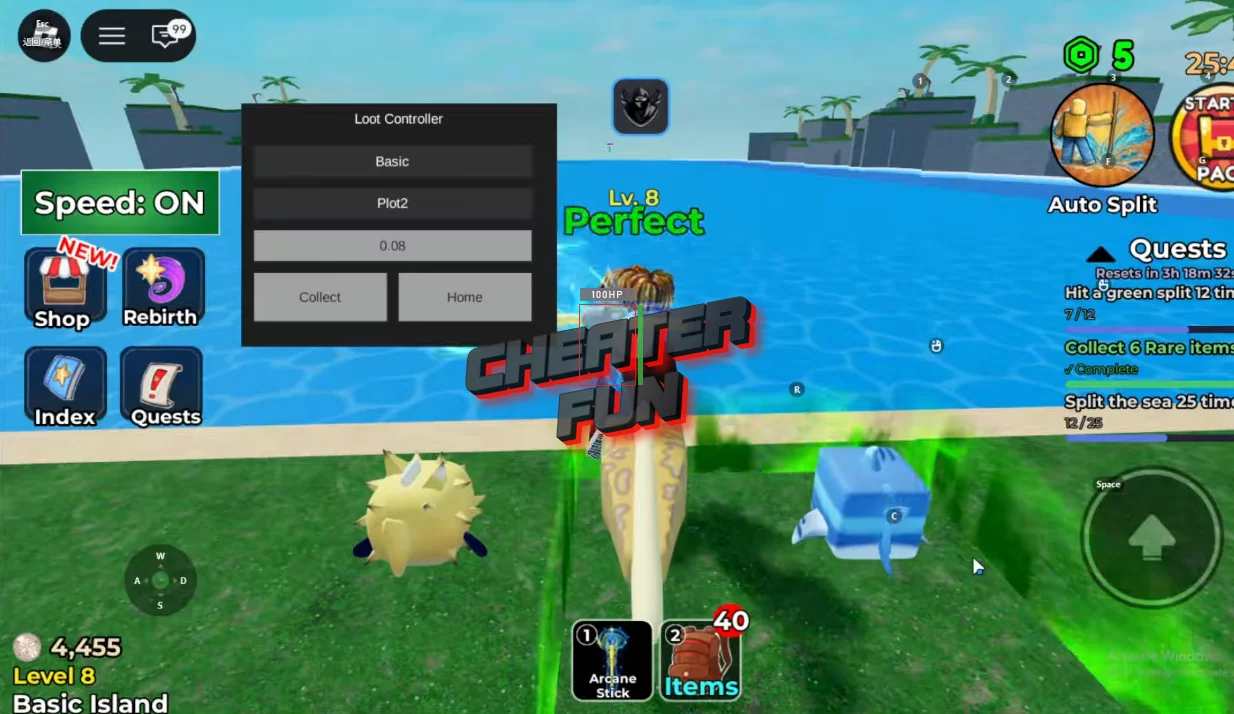
On this page, I’m sharing with you the only working script for Split The Sea from the Roblox universe, featuring Loot Controller, Auto Farm, and Teleport functions—all available without a key or any additional steps. It’s the perfect script that works on both PC and mobile.
At first glance, the game “Split The Sea” seems simple you charge up, smash, collect loot, and repeat. But as soon as you start hunting for the best trophies among more than 1,000 possible loot options, the routine becomes very tedious. This Split The Sea script is designed to significantly simplify this cycle.
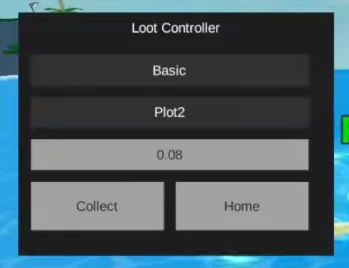
Thanks to the Loot Controller features, which give you a more direct way to control where and how you farm. You can switch targets, control collection timing, and use quick buttons like “Collect” and “Home” to keep your runs efficient, instead of wasting time on manual movement.
Split The Sea Script (ToraHub GUI) - Instant Loot Items, Fast Coins
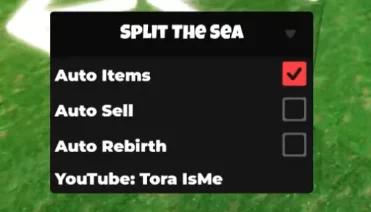
loadstring(game:HttpGet("https://raw.githubusercontent.com/gumanba/Scripts/main/SplitTheSea"))()Get Script Split The Sea GUI Roblox (Loot controller) NO KEY
local Players = game:GetService("Players")
local UserInputService = game:GetService("UserInputService")

local player = Players.LocalPlayer
local playerGui = player:WaitForChild("PlayerGui")

--// SETTINGS
local CURRENT_PLOT = "Plot1"
local CURRENT_ISLAND = "Basic"
local TELEPORT_DELAY = 0.08

local ISLANDS = {"Basic", "VoidReef", "CyberTech", "RainbowReef", "RadioactiveReef"}
local PLOTS = {"Plot1", "Plot2", "Plot3", "Plot4", "Plot5"}

local lootFolder = workspace:WaitForChild("ActiveLoot")
local busy = false

--// GUI
local screenGui = Instance.new("ScreenGui", playerGui)
screenGui.ResetOnSpawn = false

local frame = Instance.new("Frame", screenGui)
frame.Size = UDim2.new(0, 260, 0, 200)
frame.Position = UDim2.new(0.1, 0, 0.2, 0)
frame.BackgroundColor3 = Color3.fromRGB(30,30,30)
frame.Active = true
frame.Draggable = true

local title = Instance.new("TextLabel", frame)
title.Size = UDim2.new(1,0,0,25)
title.Text = "Loot Controller"
title.BackgroundTransparency = 1
title.TextColor3 = Color3.new(1,1,1)

--// DROPDOWN FUNCTION
local function createDropdown(parent, position, options, default, callback)
    local container = Instance.new("Frame", parent)
    container.Position = position
    container.Size = UDim2.new(0, 230, 0, 25)
    container.BackgroundColor3 = Color3.fromRGB(50,50,50)
    container.ZIndex = 2

    local button = Instance.new("TextButton", container)
    button.Size = UDim2.new(1,0,1,0)
    button.Text = default
    button.TextColor3 = Color3.new(1,1,1)
    button.BackgroundTransparency = 1
    button.ZIndex = 3

    local listFrame = Instance.new("Frame", container)
    listFrame.Position = UDim2.new(0,0,1,0)
    listFrame.Size = UDim2.new(1,0,0,#options * 25)
    listFrame.BackgroundColor3 = Color3.fromRGB(40,40,40)
    listFrame.Visible = false
    listFrame.ZIndex = 10 -- 🔥 HIGH so it appears on top

    for i, option in ipairs(options) do
        local opt = Instance.new("TextButton", listFrame)
        opt.Size = UDim2.new(1,0,0,25)
        opt.Position = UDim2.new(0,0,0,(i-1)*25)
        opt.Text = option
        opt.BackgroundTransparency = 1
        opt.TextColor3 = Color3.new(1,1,1)
        opt.ZIndex = 11 -- above dropdown background

        opt.MouseButton1Click:Connect(function()
            button.Text = option
            listFrame.Visible = false
            callback(option)
        end)
    end

    button.MouseButton1Click:Connect(function()
        listFrame.Visible = not listFrame.Visible
    end)

    return button
end

-- Island dropdown
createDropdown(frame, UDim2.new(0,10,0,35), ISLANDS, CURRENT_ISLAND, function(val)
    CURRENT_ISLAND = val
end)

-- Plot dropdown
createDropdown(frame, UDim2.new(0,10,0,70), PLOTS, CURRENT_PLOT, function(val)
    CURRENT_PLOT = val
end)

-- Delay input
local delayBox = Instance.new("TextBox", frame)
delayBox.Position = UDim2.new(0,10,0,105)
delayBox.Size = UDim2.new(0,230,0,25)
delayBox.Text = tostring(TELEPORT_DELAY)

delayBox.FocusLost:Connect(function()
    local val = tonumber(delayBox.Text)
    if val then
        TELEPORT_DELAY = val
    end
end)

-- Buttons
local collectBtn = Instance.new("TextButton", frame)
collectBtn.Position = UDim2.new(0,10,0,140)
collectBtn.Size = UDim2.new(0,110,0,40)
collectBtn.Text = "Collect"

local homeBtn = Instance.new("TextButton", frame)
homeBtn.Position = UDim2.new(0,130,0,140)
homeBtn.Size = UDim2.new(0,110,0,40)
homeBtn.Text = "Home"

--// LOGIC

local function getSafeZone()
    local island = workspace:WaitForChild("Islands"):FindFirstChild(CURRENT_ISLAND)
    if not island then return nil end

    local plot = island:WaitForChild("Plots"):FindFirstChild(CURRENT_PLOT)
    if not plot then return nil end

    return plot:WaitForChild("Important"):FindFirstChild("SafeZone")
end

local function getMatchingLoot()
    local matches = {}

    local character = player.Character or player.CharacterAdded:Wait()
    local hrp = character:WaitForChild("HumanoidRootPart")

    for _, model in ipairs(lootFolder:GetChildren()) do
        if model:IsA("Model") and model:GetAttribute("PlotName") == CURRENT_PLOT then
            local pivot = model:GetPivot()
            local distance = (pivot.Position - hrp.Position).Magnitude

            if distance <= 800 then
                table.insert(matches, model)
            end
        end
    end

    return matches
end

local function teleportOnce()
    if busy then return end
    busy = true

    local character = player.Character or player.CharacterAdded:Wait()
    local hrp = character:WaitForChild("HumanoidRootPart")

    for _, model in ipairs(getMatchingLoot()) do
        if model and model.Parent then
            hrp.CFrame = model:GetPivot() + Vector3.new(0,2,0)
        end
        task.wait(TELEPORT_DELAY)
    end

    busy = false
end

local function teleportHome()
    local safeZone = getSafeZone()
    if not safeZone then return end

    local character = player.Character or player.CharacterAdded:Wait()
    local hrp = character:WaitForChild("HumanoidRootPart")

    hrp.CFrame = safeZone.CFrame + Vector3.new(0,3,0)
end

-- Buttons
collectBtn.MouseButton1Click:Connect(teleportOnce)
homeBtn.MouseButton1Click:Connect(teleportHome)

-- Hotkeys
UserInputService.InputBegan:Connect(function(input, gp)
    if gp then return end

    if input.KeyCode == Enum.KeyCode.G then
        teleportOnce()
    elseif input.KeyCode == Enum.KeyCode.F then
        teleportHome()
    end
end)
Split The Sea Script Features:
Loot Controller
Collect button
Home button
Auto Farm
Teleport
Target/plot selection
Collection timing control

