
One of the best scripts on Jujutsu Shenanigans (Roblox) which has been updated for the new game update, Auto Farm, Auto Attack, ESP and More functions work without any problems. All functionality is controlled through the standard GUI from the developer NS Hub, select the function you want in one click and enjoy the easy process of the game. Using this script in the game Jujutsu Shenanigans you will be able to activate automatic functions of farming items, points, coins, as well as automatic attack, automatic farming players, esp to see enemies and items through the textures on the map and much more. This is probably the only free and best script on Jujutsu Shenanigans that works without any problems and bugs.
Below, I will post for you the latest and working scripts and hacks for Jujutsu Shenanigans from the Roblox gaming universe that work without any problems on PC and Mobile. These scripts have been tested using the Delta script executor.
Jujutsu Shenanigans Halloween Script (NO KEY) | Door ESP, Instant Interact
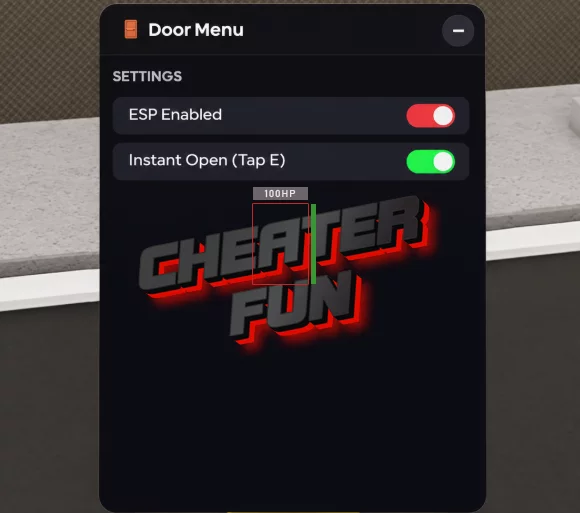
--============================================================
-- DOOR ESP + INSTANT PROMPT — Clean GUI
-- LocalScript — StarterPlayer > StarterPlayerScripts
--============================================================

local Players             = game:GetService("Players")
local RunService          = game:GetService("RunService")
local ProximityPromptService = game:GetService("ProximityPromptService")

local LocalPlayer = Players.LocalPlayer
local Camera      = workspace.CurrentCamera

------------------------------------------------------------
-- CONFIG
------------------------------------------------------------
local Config = {
    ESP = {
        Enabled = true,
        ShowDistance = true,
        ShowName = true,
    },
    Colors = {
        ["door"]          = Color3.fromRGB(255, 200, 80),   -- yellow
        ["halloweendoor"] = Color3.fromRGB(255, 120, 40),   -- orange
    },
    MaxDistance = 5000,
    InstantPrompt = true, -- Toggle for skipping the hold duration
}

------------------------------------------------------------
-- ROOT GUI
------------------------------------------------------------
local ScreenGui = Instance.new("ScreenGui")
ScreenGui.Name = "DoorESP"
ScreenGui.ResetOnSpawn = false
ScreenGui.IgnoreGuiInset = true
ScreenGui.DisplayOrder = 2147483647
ScreenGui.Parent = LocalPlayer:WaitForChild("PlayerGui")

------------------------------------------------------------
-- HELPERS
------------------------------------------------------------
local function getColor(name)
    return Config.Colors[name:lower()]
end

local function getRoot(inst)
    if inst:IsA("BasePart") then return inst end
    if inst:IsA("Model") then
        return inst.PrimaryPart
            or inst:FindFirstChild("HumanoidRootPart")
            or inst:FindFirstChild("Head")
            or inst:FindFirstChildWhichIsA("BasePart")
    end
    return nil
end

------------------------------------------------------------
-- INSTANT INTERACT (HOLD BYPASS)
------------------------------------------------------------
-- This watches every prompt the game renders. If it belongs to
-- a door, we force its HoldDuration to 0 so it fires instantly.
local function checkPrompt(prompt)
    if not Config.InstantPrompt then return end
    if not prompt or not prompt.Parent then return end

    -- Find if this prompt is inside a door
    local parentModel = prompt:FindFirstAncestorOfClass("Model")
    local targetName = parentModel and parentModel.Name or prompt.Parent.Name

    if Config.Colors[targetName:lower()] then
        pcall(function()
            prompt.HoldDuration = 0
            prompt.MaxActivationDistance = 15 -- Ensure it's reachable
        end)
    end
end

-- Hook existing prompts immediately
for _, obj in ipairs(workspace:GetDescendants()) do
    if obj:IsA("ProximityPrompt") then
        checkPrompt(obj)
    end
end

-- Hook new prompts as they spawn
workspace.DescendantAdded:Connect(function(obj)
    if obj:IsA("ProximityPrompt") then
        task.defer(checkPrompt, obj)
    end
end)

-- Also catch prompts the moment they appear on your screen
ProximityPromptService.PromptShown:Connect(function(prompt)
    checkPrompt(prompt)
end)

------------------------------------------------------------
-- ESP TRACKER
------------------------------------------------------------
local tracked = {}

local function addESP(inst)
    if tracked[inst] then return end
    local color = getColor(inst.Name)
    if not color then return end
    if not (inst:IsA("Model") or inst:IsA("BasePart")) then return end

    local ok = pcall(function()
        local hl = Instance.new("Highlight")
        hl.FillColor = color
        hl.FillTransparency = 0.55
        hl.OutlineColor = color
        hl.OutlineTransparency = 0
        hl.DepthMode = Enum.HighlightDepthMode.AlwaysOnTop
        hl.Adornee = inst
        hl.Parent = inst

        local adornee = getRoot(inst) or inst
        local bb = Instance.new("BillboardGui")
        bb.Size = UDim2.new(0, 220, 0, 30)
        bb.StudsOffsetWorldSpace = Vector3.new(0, 2.5, 0)
        bb.AlwaysOnTop = true
        bb.MaxDistance = Config.MaxDistance
        bb.Adornee = adornee

        local label = Instance.new("TextLabel")
        label.Size = UDim2.new(1, 0, 1, 0)
        label.BackgroundTransparency = 1
        label.TextColor3 = color
        label.Font = Enum.Font.GothamBold
        label.TextSize = 14
        label.TextStrokeTransparency = 0.4
        label.Text = ""
        label.Parent = bb
        bb.Parent = inst

        tracked[inst] = { hl = hl, bb = bb, label = label, root = adornee }
    end)
    if not ok then tracked[inst] = nil end
end

local function removeESP(inst)
    local d = tracked[inst]
    if not d then return end
    pcall(function() d.hl:Destroy() end)
    pcall(function() d.bb:Destroy() end)
    tracked[inst] = nil
end

------------------------------------------------------------
-- SCAN
------------------------------------------------------------
local function scan(container, depth)
    depth = depth or 0
    if depth > 5 then return end
    for _, obj in ipairs(container:GetChildren()) do
        if obj:IsA("Folder") or obj:IsA("Configuration") then
            scan(obj, depth + 1)
        elseif Config.Colors[obj.Name:lower()] and not tracked[obj] then
            if obj:IsA("Model") or obj:IsA("BasePart") then
                addESP(obj)
            end
        end
    end
end

scan(workspace)

workspace.DescendantAdded:Connect(function(obj)
    if Config.Colors[obj.Name:lower()] and not tracked[obj] then
        if obj:IsA("Model") or obj:IsA("BasePart") then
            addESP(obj)
        end
    end
end)

workspace.DescendantRemoving:Connect(function(obj)
    if tracked[obj] then removeESP(obj) end
end)

------------------------------------------------------------
-- ESP LABEL UPDATE
------------------------------------------------------------
RunService.RenderStepped:Connect(function()
    if not Config.ESP.Enabled then
        for _, d in pairs(tracked) do
            if d.hl then d.hl.Enabled = false end
            if d.bb then d.bb.Enabled = false end
        end
        return
    end

    local camPos = Camera.CFrame.Position
    for inst, d in pairs(tracked) do
        if not inst.Parent then
            removeESP(inst)
        else
            local root = d.root
            if not root or not root.Parent then
                root = getRoot(inst)
                d.root = root
            end
            if root then
                d.hl.Enabled = true
                d.bb.Enabled = true

                local parts = {}
                if Config.ESP.ShowName then parts[#parts + 1] = inst.Name end
                if Config.ESP.ShowDistance then
                    local dist = (camPos - root.Position).Magnitude
                    parts[#parts + 1] = string.format("%dm", math.floor(dist))
                end
                d.label.Text = table.concat(parts, "  ")
            end
        end
    end
end)

------------------------------------------------------------
-- GUI BUILD
------------------------------------------------------------
local Orb = Instance.new("TextButton")
Orb.Size = UDim2.new(0, 50, 0, 50)
Orb.Position = UDim2.new(0, 20, 0.5, -25)
Orb.BackgroundColor3 = Color3.fromRGB(200, 100, 30)
Orb.Text = "🚪"
Orb.TextColor3 = Color3.fromRGB(255, 255, 255)
Orb.Font = Enum.Font.GothamBold
Orb.TextSize = 22
Orb.BorderSizePixel = 0
Orb.Parent = ScreenGui
Instance.new("UICorner", Orb).CornerRadius = UDim.new(1, 0)
local obs = Instance.new("UIStroke", Orb)
obs.Color = Color3.fromRGB(255, 180, 80); obs.Thickness = 2

local Main = Instance.new("Frame")
Main.Size = UDim2.new(0, 300, 0, 400)
Main.Position = UDim2.new(0.5, -150, 0.5, -200)
Main.BackgroundColor3 = Color3.fromRGB(18, 18, 22)
Main.BorderSizePixel = 0
Main.Active = true
Main.Draggable = true
Main.Visible = false
Main.Parent = ScreenGui
Instance.new("UICorner", Main).CornerRadius = UDim.new(0, 12)
local ms = Instance.new("UIStroke", Main)
ms.Color = Color3.fromRGB(70, 50, 40); ms.Thickness = 1

Orb.MouseButton1Click:Connect(function() Main.Visible = not Main.Visible end)

local Header = Instance.new("Frame")
Header.Size = UDim2.new(1, 0, 0, 40)
Header.BackgroundColor3 = Color3.fromRGB(28, 24, 22)
Header.BorderSizePixel = 0
Header.Parent = Main
Instance.new("UICorner", Header).CornerRadius = UDim.new(0, 12)
local hf = Instance.new("Frame")
hf.Size = UDim2.new(1, 0, 0, 12); hf.Position = UDim2.new(0, 0, 1, -12)
hf.BackgroundColor3 = Header.BackgroundColor3; hf.BorderSizePixel = 0
hf.Parent = Header

local Title = Instance.new("TextLabel")
Title.Size = UDim2.new(1, -46, 1, 0); Title.Position = UDim2.new(0, 16, 0, 0)
Title.BackgroundTransparency = 1
Title.Text = "🚪  Door Menu"
Title.TextColor3 = Color3.fromRGB(240, 230, 235)
Title.Font = Enum.Font.GothamBold; Title.TextSize = 14
Title.TextXAlignment = Enum.TextXAlignment.Left
Title.Parent = Header

local CloseBtn = Instance.new("TextButton")
CloseBtn.Size = UDim2.new(0, 24, 0, 24)
CloseBtn.Position = UDim2.new(1, -32, 0.5, -12)
CloseBtn.BackgroundColor3 = Color3.fromRGB(50, 40, 45)
CloseBtn.Text = "–"; CloseBtn.TextColor3 = Color3.fromRGB(220, 220, 230)
CloseBtn.Font = Enum.Font.GothamBold; CloseBtn.TextSize = 16
CloseBtn.BorderSizePixel = 0; CloseBtn.Parent = Header
Instance.new("UICorner", CloseBtn).CornerRadius = UDim.new(1, 0)
CloseBtn.MouseButton1Click:Connect(function() Main.Visible = false end)

local Content = Instance.new("ScrollingFrame")
Content.Size = UDim2.new(1, -16, 1, -50)
Content.Position = UDim2.new(0, 8, 0, 46)
Content.BackgroundTransparency = 1
Content.BorderSizePixel = 0
Content.ScrollBarThickness = 3
Content.ScrollBarImageColor3 = Color3.fromRGB(90, 50, 60)
Content.CanvasSize = UDim2.new(0, 0, 0, 0)
Content.AutomaticCanvasSize = Enum.AutomaticSize.Y
Content.Parent = Main
Instance.new("UIListLayout", Content).Padding = UDim.new(0, 6)

local function section(text)
    local h = Instance.new("Frame")
    h.Size = UDim2.new(1, -8, 0, 20)
    h.BackgroundTransparency = 1; h.Parent = Content
    local l = Instance.new("TextLabel")
    l.Size = UDim2.new(1, 0, 1, 0)
    l.BackgroundTransparency = 1; l.Text = text
    l.TextColor3 = Color3.fromRGB(150, 130, 140)
    l.Font = Enum.Font.GothamBold; l.TextSize = 11
    l.TextXAlignment = Enum.TextXAlignment.Left
    l.Parent = h
end

local function toggle(name, getState, setState, accent)
    local btn = Instance.new("TextButton")
    btn.Size = UDim2.new(1, -8, 0, 30)
    btn.BackgroundColor3 = Color3.fromRGB(34, 30, 38)
    btn.BorderSizePixel = 0; btn.Text = ""; btn.Parent = Content
    Instance.new("UICorner", btn).CornerRadius = UDim.new(0, 6)
    local lbl = Instance.new("TextLabel")
    lbl.Size = UDim2.new(1, -56, 1, 0); lbl.Position = UDim2.new(0, 12, 0, 0)
    lbl.BackgroundTransparency = 1; lbl.Text = name
    lbl.TextColor3 = Color3.fromRGB(220, 218, 225)
    lbl.Font = Enum.Font.Gotham; lbl.TextSize = 13
    lbl.TextXAlignment = Enum.TextXAlignment.Left
    lbl.Parent = btn
    local ind = Instance.new("Frame")
    ind.Size = UDim2.new(0, 36, 0, 18)
    ind.Position = UDim2.new(1, -46, 0.5, -9)
    ind.BackgroundColor3 = Color3.fromRGB(58, 52, 60)
    ind.BorderSizePixel = 0; ind.Parent = btn
    Instance.new("UICorner", ind).CornerRadius = UDim.new(1, 0)
    local dot = Instance.new("Frame")
    dot.Size = UDim2.new(0, 14, 0, 14)
    dot.Position = UDim2.new(0, 2, 0.5, -7)
    dot.BackgroundColor3 = Color3.fromRGB(210, 205, 210)
    dot.BorderSizePixel = 0; dot.Parent = ind
    Instance.new("UICorner", dot).CornerRadius = UDim.new(1, 0)
    local function refresh()
        if getState() then
            ind.BackgroundColor3 = accent or Color3.fromRGB(200, 60, 70)
            dot.Position = UDim2.new(1, -16, 0.5, -7)
        else
            ind.BackgroundColor3 = Color3.fromRGB(58, 52, 60)
            dot.Position = UDim2.new(0, 2, 0.5, -7)
        end
    end
    btn.MouseButton1Click:Connect(function() setState(not getState()); refresh() end)
    refresh()
end

-- ===== SETTINGS =====
section("SETTINGS")
toggle("ESP Enabled", function() return Config.ESP.Enabled end, function(v) Config.ESP.Enabled = v end)
toggle("Instant Open (Tap E)", function() return Config.InstantPrompt end, function(v)
    Config.InstantPrompt = v
    -- Apply instantly to all currently loaded prompts
    for _, obj in ipairs(workspace:GetDescendants()) do
        if obj:IsA("ProximityPrompt") then checkPrompt(obj) end
    end
end, Color3.fromRGB(80, 200, 120))

------------------------------------------------------------
-- EXPOSE DESTROY HOOK
------------------------------------------------------------
_G.DoorESP_Destroy = function()
    for inst in pairs(tracked) do removeESP(inst) end
    pcall(function() ScreenGui:Destroy() end)
    _G.DoorESP_Destroyed = true
    print("[Door Menu] Destroyed.")
end

print("[Door Menu] Loaded — click 🚪 to open.")
Jujutsu Shenanigans Script: Culling Hub (NO KEY)

loadstring(game:HttpGet("https://raw.githubusercontent.com/damir512/CullingHubv1.0/refs/heads/main/Cullingotoole.lua", true))()Jujutsu Shenanigans (JS Roblox) Script Axon Hub - Auto Farm GUI

loadstring(game:HttpGet("https://api.luarmor.net/files/v3/loaders/97c3f6db55a2cf72141537a85458e5a7.lua"))()[BLACK DEATH] Jujutsu Shenanigans Script - New Updated, Auto Farm, Auto Kill

loadstring(game:HttpGet("https://raw.githubusercontent.com/solarastuff/tze/refs/heads/main/JujutsuerV2.lua"))()JJS Script Best Xenon Hub - Aimlock, Auto Blackflash, Auto Block

loadstring(game:HttpGet("https://api.luarmor.net/files/v3/loaders/eed1b8c86a83b71bf7e8ec398fc39401.lua"))()Jujutsu Shenanigans Script (Flow Hub) - No Stun, Auto Farm Players, Anti AFK, OP Abbilitie, Aimbot, ESP

loadstring(game:HttpGet("https://api.luarmor.net/files/v4/loaders/5946add9ab91f1e04cb005346a8b1968.lua"))()[APRIL FOOLS] Jujutsu Shenanigans Script (JN Hub) - Cam Lock, Anti Combo, Speed, Void Kill

loadstring(game:HttpGet("https://raw.githubusercontent.com/JNHHGaming/Jjk-shen/refs/heads/main/JN%20HH%20Gaming",true))()Jujutsu Shenanigans Script (Qwenzy Hub) - No Stun, Auto Farm Players, Anti Afk, OP Abbilitie

loadstring(game:HttpGet("https://api.jnkie.com/api/v1/luascripts/public/32b7f3c83ac4e76546b56634ca2937addc3383a0b12b99dc4f51d1d58bdad1e8/download"))()Jujutsu Shenanigans Script (MD Hub) No Key - 100% Auto Black Flash Hit, Auto Block

loadstring(game:HttpGet("https://raw.githubusercontent.com/zenin-com/MDHub-Jujutsu-Shenanigans/refs/heads/main/%5BMdhub-jjs_v2%5D",true))()Jujutsu Shenanigans Script Best (Imp Hub X) - Auto Farm, Auto Kill Players, Auto Block, ESP

script_key = "";
loadstring(game:HttpGet("https://api.luarmor.net/files/v3/loaders/34824c86db1eba5e5e39c7c2d6d7fdfe.lua"))()
Jujutsu Shenanigans Script Roblox | Auto Parry, Auto Farm, Auto Block, GodMode

loadstring(game:HttpGet('https://raw.githubusercontent.com/NotEnoughJack/localplayerscripts/refs/heads/main/script'))()Jujutsu Shenanigans Script Best Plutonium Hub - Auto Attack, Auto Farm, Auto Block

loadstring(game:HttpGet("https://raw.githubusercontent.com/PawsThePaw/Plutonium.AA/main/Plutonium.Loader.lua", true))()Jujutsu Shenanigans Script NO KEY 2026 - Auto Blackflash
loadstring(game:HttpGet('https://raw.githubusercontent.com/long191910/all-my-roblox-script/refs/heads/main/jjsblackflash.lua'))()Jujutsu Shenanigans Script Best TBO - Auto Farm Players, No Stun, Anti AFK, OP Abbilitie

loadstring(game:HttpGet("https://raw.githubusercontent.com/cool5013/TBO/main/TBOscript"))()Jujutsu Shenanigans Script - AimLock (NO KEY, Open Source)
loadstring(game:HttpGet('https://raw.githubusercontent.com/grebblylaort/Jujutsu-Shenanigans-FREE_NO_KEY/main/main.lua'))()Script [HEAD OF THE HEI] Jujutsu Shenanigans: ESP Players and More
loadstring(game:HttpGet("https://raw.githubusercontent.com/DeadScripter/Deadhub/refs/heads/main/DeadLoader.lua"))()Get Jujutsu Shenanigans Script GUI - Auto Farm, Auto Attack [Pastebin]

loadstring(game:HttpGet("https://pastebin.com/raw/PhXmuAi8"))()
Get Script Jujutsu Shenanigans - NoClip, Power Jump, WalkSpeed
loadstring(game:HttpGet("https://raw.githubusercontent.com/100DaysWithoutHuman/100Days/refs/heads/main/Jjs"))()

--key | bestscriptfr
Get Script Jujutsu Shenanigans Pastebin NS Hub

loadstring(game:HttpGet("https://raw.githubusercontent.com/OhhMyGehlee/solj/main/ne"))()Features:
Auto Farm Players
Auto Attack
ESP
Auto Use Skills
More...
ChangeLogs:
- Updated Script Jujutsu Shenanigans Pastebin NS Hub
New comments
{
"dwViewMatrix": 16245574,
"dwLocalPlayerPawn": 79020112,
"dwEntityList": 41011370,
"m_hPlayerPawn": 2348,
"m_iHealth": 814,
"m_lifeState": 852,
"m_iTeamNum": 999,
"m_vOldOrigin": 5284,
"m_pGameSceneNode": 820,
"m_modelState": 320,
"m_boneArray": 118,
"m_nodeToWorld": 16,
"m_sSanitizedPlayerName": 2168
}
Join Shika Discord cuz i don't think they will update this cheat in this website it's been a long time since the last "Free Update"
pls udpate or u guys know another cheat working
ı love you pls update :)
thanks