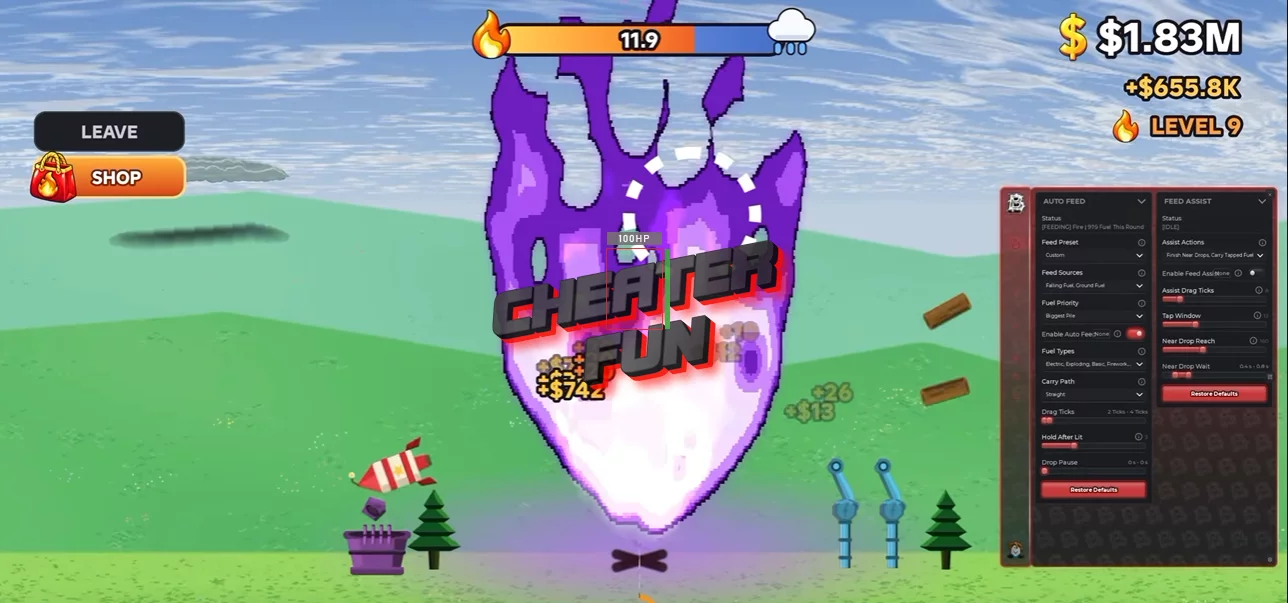
Feed the Fire Script focuses on automating fuel handling, fire growth, and long-term progression. Instead of manually collecting and dragging every piece of fuel, the available features help gather items, feed the fire, and manage upgrades.
It also includes round automation, upgrade priorities, spawner placement, cutscene skipping, and reward collection. These tools are aimed at reducing repetitive actions so you can spend more time developing your fire and preparing for increasingly difficult storms.
About Feed the Fire
A tiny campfire won't survive much when the weather turns nasty. In Feed the Fire, your job is to keep the flames growing by feeding them whatever fuel you can find - logs, batteries, explosives, fireworks, and much more. Every item burned earns money, and a bigger fire means better earnings.
Feed the Fire Script Barrage Hub | AUTO FEED, FEED ASSIST, AUTO ROUND, AUTO UPGRADE
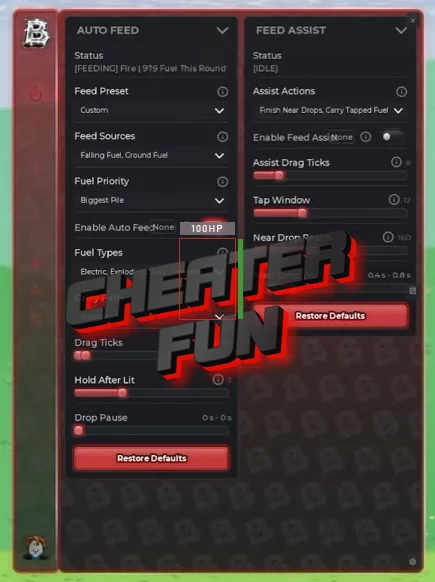
loadstring(game:HttpGet("https://barrage.cc/loader"))()Feed the Fire Script Features
🪵 Fuel Collection & Feeding
Auto Feed – Automatically feeds fuel into the fire.
Falling Fuel Collection – Collects fuel that falls into the play area.
Ground Fuel Collection – Collects fuel lying on the ground.
Feed Assist – Provides assistance when feeding fuel to the fire.
🔥 Rounds & Survival
Auto Round – Automates supported round-related actions.
Skip Cutscenes – Skips supported cutscenes to get back to gameplay faster.
⬆️ Upgrades & Progression
Automatic Upgrades – Automatically purchases available upgrades.
Upgrade Priorities – Set which upgrades should be prioritized.
Spawner Placement – Provides automation for placing spawners.
🎁 Rewards
Auto Claim – Automatically claims available rewards.
