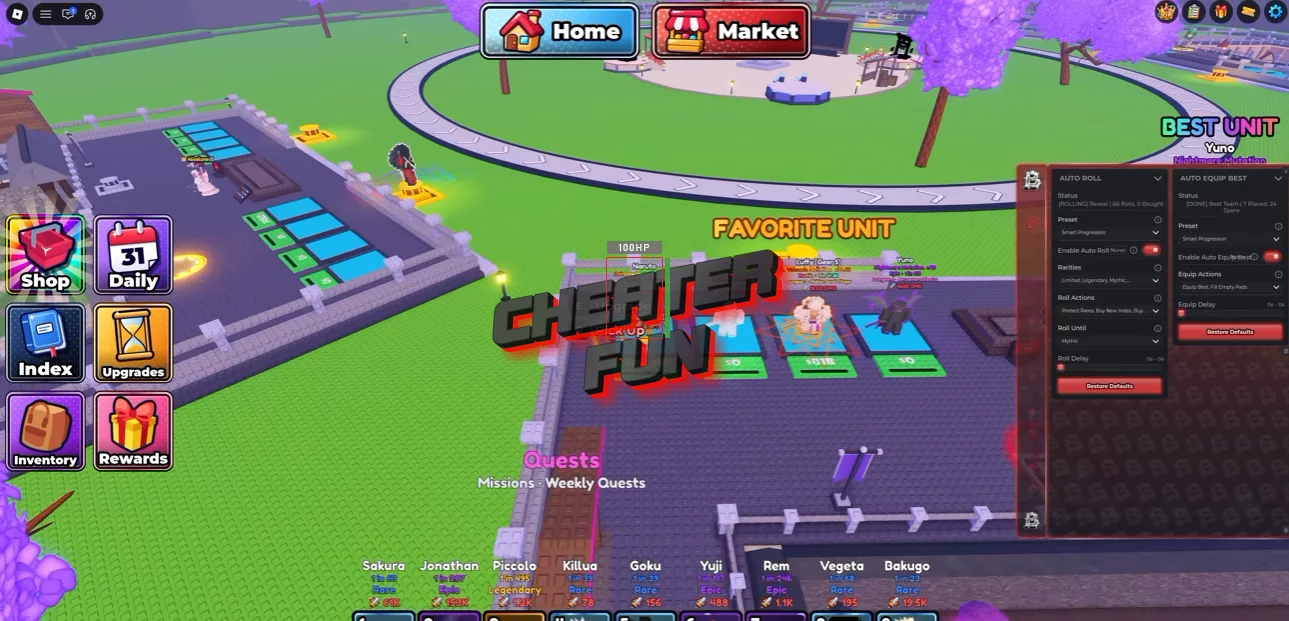
My Anime Team Script includes an extensive collection of automation features for summoning, team management, dungeon progression, mutations, upgrades, and resource farming.
Its Auto Roll system offers Blatant and Smart Progression presets, multiple rarity options, and configurable roll delays. Auto Equip Best helps organize your team, while Auto Tap and Auto Collect automate combat interactions and resource gathering.
About My Anime Team
Build your ultimate anime squad and send your heroes into dangerous dungeons in My Anime Team, an incremental anime RPG where collecting powerful characters is only the beginning!
Roll to summon more than 65 anime-inspired fighters, assemble your dream team, and send your heroes into battle to collect valuable loot. Inspired by popular anime universes such as One Piece, Naruto, Demon Slayer, and Jujutsu Kaisen, the game offers plenty of characters to discover and develop.
My Anime Team Script BarrageHub | AUTO ROLL, AUTO COLLECT, AUTO SELL, AUTO MUTATE
loadstring(game:HttpGet("https://barrage.cc/loader"))()My Anime Team Script Features
🎲 Auto Roll & Character Summoning
Auto Roll – Automates rolling to summon new anime characters.
Blatant Preset – Provides an aggressive rolling configuration.
Smart Progression Preset – Uses progression-based rolling priorities.
Rarity Selection – Supports the following rarities:
- Common
- Uncommon
- Rare
- Epic
- Legendary
- Mythic
- Exotic
Buy New Index – Supports purchasing new Index-related options.
Buy Upgrades – Automates available roll-related upgrades.
Protect Rares – Helps protect valuable rare characters from unwanted actions.
Roll Until – Allows you to configure when automatic rolling should stop.
Roll Delay – Adjusts the delay between rolling attempts.
🥇 Auto Equip & Team Management
Auto Equip Best – Automatically equips your strongest available characters.
Pads Only – Restricts supported automatic equipment actions to pads.
Legit Preset – Provides an alternative equipment configuration.
Equip Best – Equips the strongest available units.
Fill Empty Pads – Automatically fills available empty unit pads.
⚔️ Auto Tap & Combat
Auto Tap – Automates tapping and combat-related actions.
Highest HP – Prioritizes enemies with the highest health.
Lowest HP – Targets enemies with the lowest health.
Nearest – Prioritizes the closest available target.
Fast Tap – Provides faster automated tapping.
Tap From Anywhere – Allows tapping actions from any supported location.
Tap Assist – Provides additional assistance with tapping actions.
💰 Auto Collect & Resource Management
Auto Collect – Automates collection of available resources.
Collect Every – Configures collection timing or frequency.
Remote Collect – Provides remote collection functionality.
🪙 Auto Sell & Currency Management
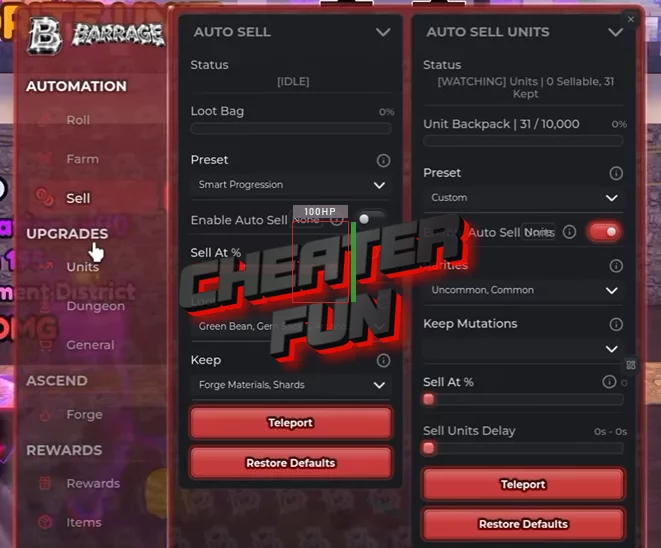
Auto Sell – Automates selling collected resources and items.
Full Bag Preset – Sells when your inventory becomes full.
Max Cash Preset – Provides a selling configuration focused on maximizing cash.
Sell At – Allows you to configure selling conditions.
Gold Coins – Supports gold coin management and selling.
Green Bean – Includes Green Bean-related selling options.
Kunai – Supports Kunai-related selling options.
Scouter – Includes Scouter-related selling options.
Keep Forge Materials – Protects selected materials used for forging.
Keep Shards – Allows you to preserve collected shards.
🧬 Auto Sell Units & Mutation Protection
Auto Sell Units – Automatically sells unwanted characters.
Batch – Configures batch selling behavior.
Keep Mutated Preset – Protects mutated units from unwanted selling.
Unit Backpack – Includes additional unit inventory management options.
Sell At – Configures the selling threshold.
Keep Mutations – Allows you to preserve selected mutations:
- Bronze
- Diamond
- Nightmare
- Permafrost
- Platinum
- Prismatic
- Rainbow
- Volcanic
📈 Auto Unit Upgrades
Auto Unit Upgrades – Automates improvements to your characters.
Damage Only Preset – Prioritizes damage upgrades.
Thrifty Preset – Uses a more economical upgrade strategy.
Attack Speed – Supports attack speed upgrades.
Damage – Improves character damage.
Walk Speed – Supports movement speed upgrades.
Max – Purchases upgrades toward the maximum available level.
One Level – Purchases upgrades one level at a time.
🗡️ Auto Swords
Auto Swords – Automates sword-related equipment progression.
Buy Swords – Automatically purchases available swords.
Equip Best Swords – Automatically equips your strongest available swords.
🏰 Auto Dungeon Upgrades
Auto Dungeon Upgrades – Automates dungeon-related upgrades.
Rush Boss – Prioritizes progression toward boss encounters.
Spend Now – Spends available resources immediately when conditions allow.
Cheapest First – Prioritizes the least expensive upgrades.
Tree Order – Purchases upgrades according to the selected upgrade tree order.
👹 Auto Boss & World Progression
Auto Boss – Automates boss-related activities.
Spawn Boss – Handles available boss spawning actions.
Travel To New Zone – Automatically travels toward the next available zone.
💪 Auto General Upgrades
Auto General Upgrades – Automates general progression upgrades.
Pads – Supports pad-related upgrades.
Roll Speed – Improves rolling speed through available upgrades.
Stands – Includes Stand-related upgrade options.
🧪 Auto Potions
Auto Potions – Automates the use of available potions:
2x Cash – Doubles cash-related bonuses.
2x Drop Luck – Improves drop luck.
2x Luck – Increases luck-related bonuses.
✨ Auto Mutations
Auto Mutate – Automates character mutation-related activities.
Chase Best – Prioritizes the best available mutation results.
Free Only – Restricts mutation actions to free options.
Free Rolls First – Uses free rolls before spending currency.
Spend Cash – Allows cash to be used for mutation-related actions.
🔄 Auto Ascend
Auto Ascend – Automates ascension progression.
Fast Team – Uses the Fast Team progression option.
Always – Enables continuous ascension behavior when available.
Maxed Levels – Uses maximum character levels as an ascension condition.

0 comments
Information
Users of Guests are not allowed to comment this publication.
If you have a problem, write to us.