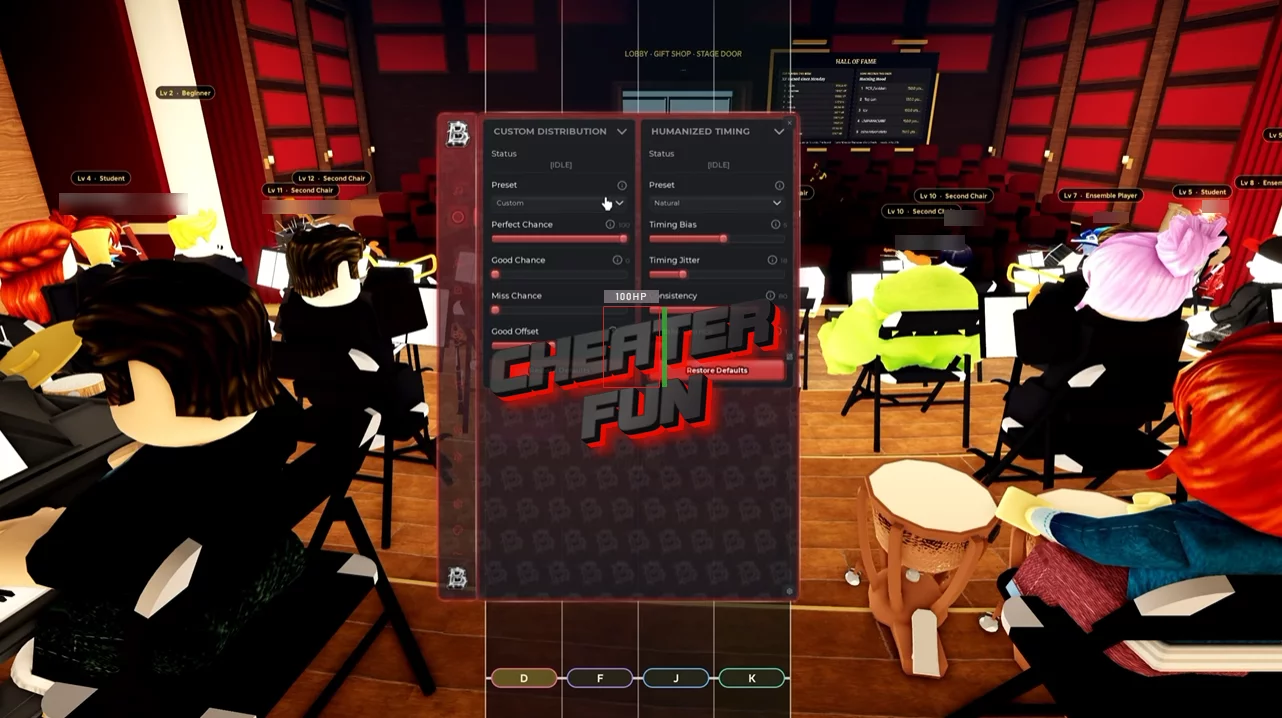
Symphony Orchestra Simulator Script includes an extensive collection of automation options for musical performances, matchmaking, song selection, reactions, and item management.
Use Auto Play with different accuracy and timing presets, customize note distribution, and automate tap notes, hold notes, and solo performances. You can also adjust humanized timing settings to customize how automated performances behave.
About Symphony Orchestra Simulator
Take your place on stage and become the star of a virtual orchestra in Symphony Orchestra Simulator! Join players from around the world and perform classical music together in a grand concert hall. Follow falling notes, play your assigned instrument, and keep the entire orchestra in sync. You might even get the chance to perform a solo in front of the audience!
Choose from 16 different instruments, including violin, cello, trumpet, flute, harp, timpani, and more. Each performance gives you an opportunity to demonstrate your musical skills and earn the audience's appreciation.
Symphony Orchestra Simulator Script Barrage Hub | AUTO PLAY, PLAY ASSIST, AUTO JOIN, AUTO REACT
loadstring(game:HttpGet("https://barrage.cc/loader"))()Symphony Orchestra Simulator Script Features
🎵 Auto Play & Performance Presets
Automate musical performances with several configurable presets:
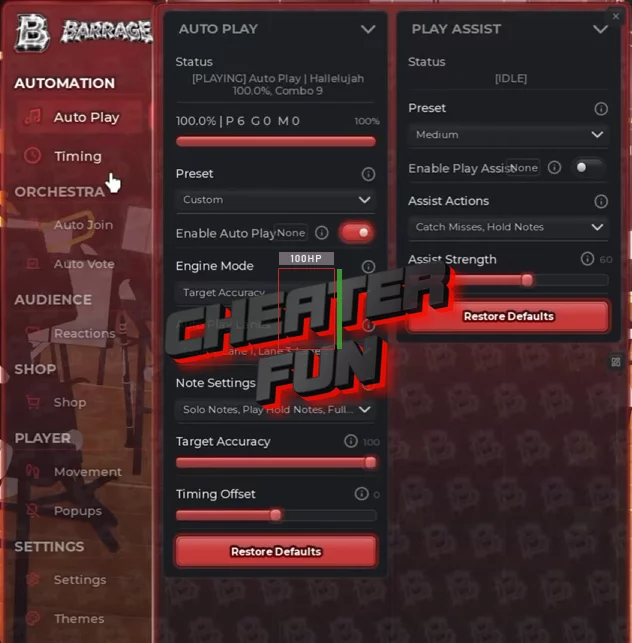
Auto Play – Automatically plays supported musical performances.
Flawless – Preset focused on flawless note accuracy.
Near Perfect – Provides a near-perfect performance configuration.
Human – Includes a human-style performance preset.
Distribution – Provides a customizable note distribution preset.
Target Accuracy – Configures the desired performance accuracy.
Humanized Timing – Adds adjustable timing variations to automated performances.
Custom Distribution Engine Modes – Allows customization of the distribution engine behavior.
Note Selection:
Every Lane – Includes all available note lanes.
Play Tap Notes – Automatically handles tap notes.
Play Hold Notes – Automates hold-note inputs.
Full Holds – Supports complete hold-note actions.
Solo Notes – Includes notes from solo performances.
Accuracy & Timing:
Target Accuracy up to 100 – Adjusts the target accuracy value up to 100.
Timing Offset – Configures the timing offset for note inputs.
🎯 Play Assist & Custom Distribution
Configure additional assistance and customize performance behavior:
Play Assist – Provides additional assistance during musical performances.
Catch Misses – Includes an option for handling missed notes.
Hold Notes – Adds assistance for hold-note inputs.
Assist Strength – Adjusts the strength of Play Assist.
Custom Distribution Presets:
Perfect Run – Preset focused on perfect performance.
Strong – Uses a strong distribution configuration.
Average – Provides a balanced distribution option.
Rough – Includes a rough distribution configuration.
Performance Chances:
Perfect Chance – Configures the chance of perfect results.
Good Chance – Adjusts the chance of good results.
Miss Chance – Configures the chance of missed notes.
Good Offset – Adjusts the timing offset associated with good results.
⏱️ Humanized Timing Settings
Fine-tune the timing behavior of Auto Play with several available profiles:
Timing Presets:
Natural – Uses natural timing variations.
Precise – Provides a more precise timing configuration.
Relaxed – Uses a relaxed timing profile.
Erratic – Includes an irregular timing profile.
Additional Controls:
Timing Bias – Adjusts timing bias.
Timing Jitter – Configures timing variation.
Consistency – Controls timing consistency.
Mistake Chance – Sets the chance of simulated mistakes.
🎼 Auto Join & Orchestra Matchmaking
Automatically join musical performances and configure your preferred participation settings:
Auto Join – Automates joining available orchestra sessions.
Quest Parts – Prioritizes parts associated with quests.
Listed Parts – Supports joining specifically listed musical parts.
Any Part – Allows joining any available part.
Every Part – Includes every available part in the selection.
Difficulty – Supports difficulty selection up to Extreme.
Queue When Taken – Automatically queues when the selected part is already occupied.
Daily Quests – Includes daily quest-related matchmaking options.
🗳️ Auto Vote & Song Selection
Automate voting for the next musical performance:
Auto Vote – Automatically votes for the next song.
New Songs – Prioritizes newly available songs.
Short Songs – Selects shorter performances.
Better Grades – Prioritizes songs based on grade potential.
Unplayed – Favors songs you haven't played yet.
Lowest – Includes a lowest-value selection priority.
Shortest – Prioritizes the shortest available songs.
🌹 Auto React & Audience Rewards
Automate audience reactions and customize how roses and other reactions are used:
Auto React – Automatically sends reactions during performances.
Free Roses – Uses available free roses.
Every Reaction – Includes all available reaction types.
Spend Coins – Configures coin spending for reactions.
React Gap – Adjusts the interval between reactions.
🛒 Auto Buy & Item Management
Automate purchases and manage your collection of customization items:
Auto Buy – Automates available item purchases.
Cheapest First – Prioritizes the least expensive items.
Priciest First – Prioritizes the most expensive items.
Keep Coins – Maintains a configurable coin reserve.
Finishes – Includes finish-related purchases.
Themes – Automates theme purchases.
Tags – Includes tag-related purchases.
Stands – Automates stand purchases.
Equip New Items – Automatically equips newly purchased items.
Coin Reserve – Sets the amount of coins to keep available.
🏃 Movement Mods
Customize character movement with several additional options:
Infinite Jump – Allows repeated jumping.
Jump Boost – Enhances jumping ability.
Noclip – Enables movement through objects.
Speed – Adjusts movement speed.
⚙️ Popup Management
Automatically close different in-game popups:
Purchase Prompts – Closes purchase-related prompts.
Starter Offer – Automatically closes the Starter Offer.
Welcome – Closes welcome popups.
What's New – Automatically closes update and What's New notifications.
💤 Anti-AFK
Anti-AFK – Helps prevent inactivity kicks during extended performances and farming sessions.
🎛️ Interface & Controls
Presets – Use predefined configurations for different performance styles.
Custom Keybinds – Assign custom keyboard shortcuts.
PC & Mobile Support – Supports both desktop and mobile gameplay.

0 comments
Information
Users of Guests are not allowed to comment this publication.
If you have a problem, write to us.