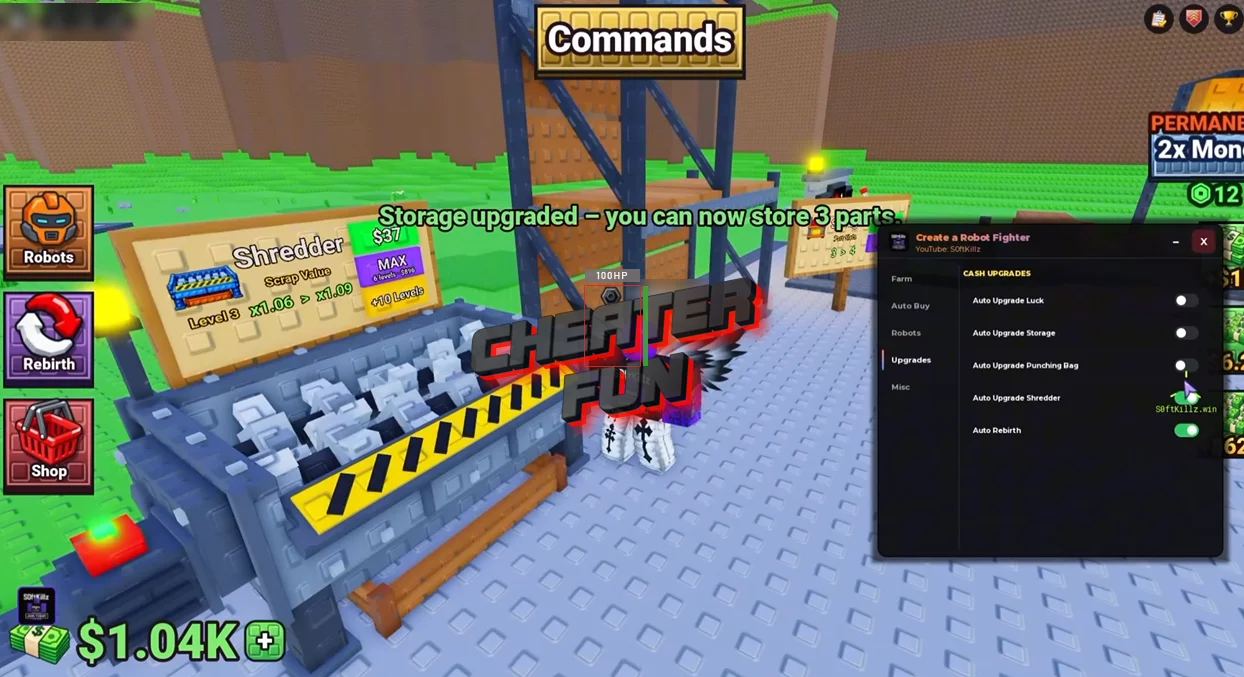
Create a Robot Fighter Script is built around automating the game's main progression systems. It includes features for rolling parts, assembling robots, training, fighting, collecting scrap, and upgrading equipment. You can also control which rarities you're looking for, choose robot sets to buy, and manage stored parts.
For players who want to speed things up, Instant Spin and Fast Fights help streamline certain activities, while Parts ESP and Fullbright provide additional visual options.
About Create a Robot Fighter
Build a robot from scratch and turn it into a fighting machine in Create a Robot Fighter! Start by rolling for robot parts, then assemble a head, body, and legs before powering up your creation. With more than 30 robots to discover and seven rarity tiers — from Common all the way to Apex — there's always a better part to chase.
Create a Robot Fighter Script SoftKillz Hub | AUTO BUY, AUTO FIGHT, AUTO BUILD, AUTO UPGRADES, AUTO FARM
loadstring(game:HttpGet("https://pastebin.com/raw/VZhHdEcK"))()Create a Robot Fighter Script Features
🔩 Robot Parts & Assembly
Auto Roll – Automates rolling for robot parts.
Instant Spin – Speeds up the spinning process.
Auto Assembly Minigames – Automates assembly-related minigames.
Auto Place Stored Parts – Automatically places stored parts.
Auto Buy Parts – Automates part purchases.
Buy Head – Provides an option to buy robot heads.
Buy Upper – Provides an option to buy upper robot parts.
Buy Lower – Provides an option to buy lower robot parts.
Robot Sets Select To Buy – Lets you select robot sets to purchase.
Change Minimum Rarity – Sets the minimum rarity for part selection or rolling.
Auto Equip Best – Automatically equips the best available parts.
Select All Robots – Selects all robots.
Clear Selected – Clears the current selection.
💪 Training & Combat
Auto Train – Automates robot training.
Fast Train – Speeds up training activities.
Auto Fight – Automates fighting activities.
Fast Fights – Speeds up fights.
Auto Power On – Automates powering on the robot.
Auto Rebirth – Automates rebirths for continued progression.
Auto Claim Quests – Automatically claims available quest rewards.
♻️ Scrap Collection & Processing
Auto Collect Scrap – Automatically collects scrap.
Auto Shred Scrap – Automates scrap shredding.
Auto Throw Away – Automates discarding selected items.
Shred After Items – Provides an option to shred items after collecting or processing them.
Auto Upgrade Shredder – Automates shredder upgrades.
Auto Upgrade Storage – Automates storage upgrades.
🍀 Luck & Equipment Upgrades
Auto Upgrade Luck – Automates luck upgrades to support the search for rarer parts.
Auto Upgrade Punching Bag – Automates punching bag upgrades.
🎯 Speed & Visual Options
Tween Speed – Adjusts movement tween speed.
Roll Delay – Configures the delay between rolls.
Parts ESP – Helps identify robot parts.
Fullbright – Brightens the game environment.
Anti-AFK – Helps reduce inactivity during gameplay.
