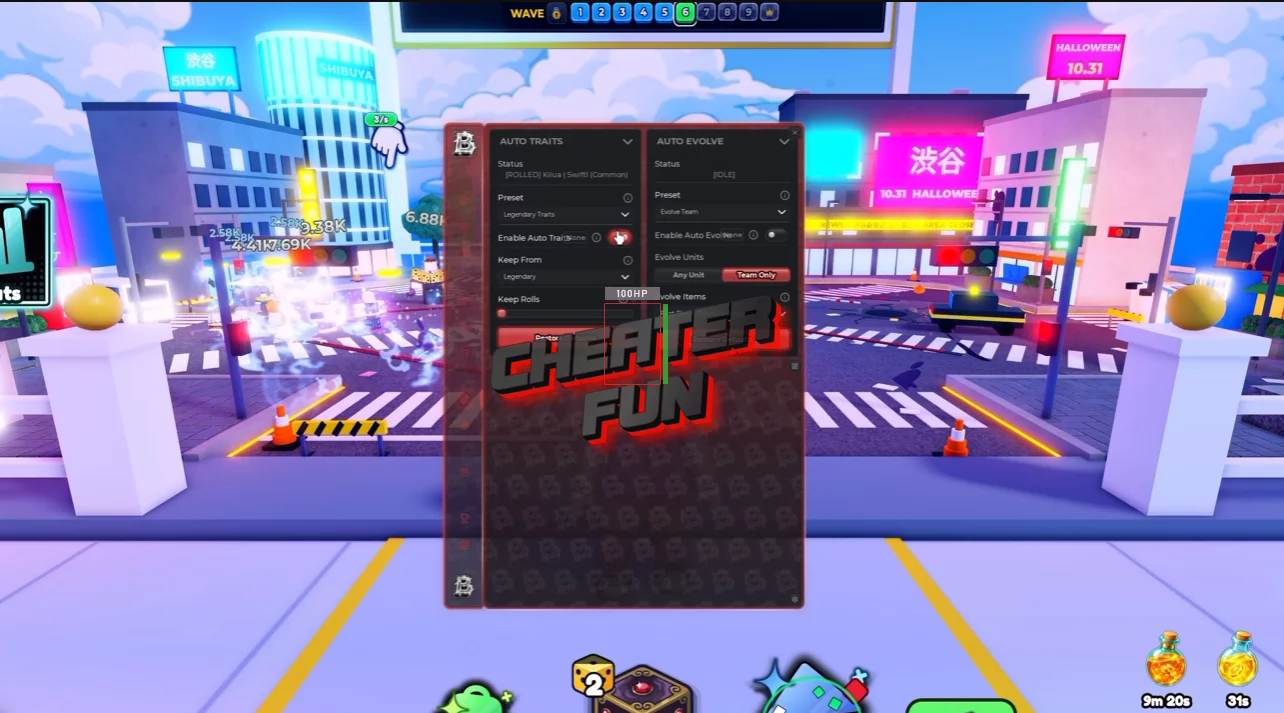
Anime Mini Fighters Script features an extensive automation system covering summoning, combat, unit management, stage progression, rebirths, boss battles, towers, and raids.
Its Auto Roll system includes Nonstop Roll and Keep Room presets, rarity protection, and free-slot management. Auto Equip Best automatically organizes your strongest team, while Auto Attack provides configurable combat settings, including attack speed, hit frequency, and enemy health priorities.
About Anime Mini Fighters
Build an army of powerful miniature anime warriors and conquer every world in Anime Mini Fighters! This incremental anime simulator combines character collecting, automated battles, dice rolling, mutations, and team progression into one adventure.
Start by rolling dice to summon tiny anime fighters and gradually build a powerful squad. Collect luck boosts to improve your chances of discovering rare Heavenly units, then lead your team through 20 different worlds filled with increasingly difficult enemies and bosses.
Anime Mini Fighters Script Barrage Hub | AUTO ROLL, AUTO ATTACK, AUTO REBIRTH, AUTO TRAITS
loadstring(game:HttpGet("https://barrage.cc/loader"))()Anime Mini Fighters Script Features
🎲 Auto Roll & Summoning
Auto Roll – Automates rolling to summon new anime fighters.
Nonstop Roll – Enables continuous automatic rolling.
Keep Room Presets – Provides room-related preservation settings.
Keep Rarities – Allows you to protect selected character rarities.
Keep Free Slots – Preserves available slots for new units.
🥇 Auto Equip & Team Management
Auto Equip – Automatically manages your equipped fighters.
Strongest Team – Prioritizes your strongest available units.
Empty Pads Only – Restricts automatic placement to unoccupied pads.
Empty Pad – Provides an empty-slot placement option.
Stronger Unit – Prioritizes replacing an equipped unit with a stronger one.
Swap Margin – Allows you to configure the strength difference required before swapping units.
⚔️ Auto Attack & Combat
Auto Attack – Automates attacks against available enemies.
Full Speed – Uses the full available attack speed.
Steady Hits – Provides a consistent attack configuration.
Highest Health – Prioritizes enemies with the highest health.
Lowest Health – Prioritizes enemies with the lowest health.
Clicks Per Second – Configures automated clicking speed, up to 12 CPS.
👹 Auto Boss
Auto Boss – Automates boss-related activities.
Walk To First Portal – Automatically travels to the first available boss portal.
Open From Anywhere – Provides an option to open boss encounters from different locations.
Open Delay – Allows you to customize the delay between boss-opening actions.
🌍 Auto Stage & World Progression
Auto Stage – Automates stage-related progression with different options:
Push Stages – Supports faster stage progression.
Buy Stages Only – Focuses on purchasing available stages.
Buy Next Stage – Automatically purchases the next available stage.
Go To Furthest Stage – Travels to the furthest available stage.
Unlock Waves – Automates unlocking available waves.
Stop At Stage – Sets a target stage where automation should stop.
🔄 Auto Rebirth
Auto Rebirth – Automates rebirth progression with configurable settings.
Endless Rebirths – Continues rebirthing whenever the requirements are met.
Fuse Unlock – Includes an option related to unlocking fusion through rebirth progression.
Rebirth Goal – Allows you to configure your desired rebirth target.
Wait For Stage – Sets a stage requirement before rebirthing.
📈 Auto Level & Unit Development
Auto Level – Automates leveling your fighters.
Even Team – Distributes leveling across your team.
Carry Unit – Focuses leveling on a selected carry unit.
Lowest Level First – Prioritizes units with the lowest level.
Strongest First – Prioritizes stronger units.
Level Budget – Allows you to configure a resource budget for leveling.
🗑️ Auto Release & Unit Protection
Auto Release – Automatically releases selected unwanted fighters.
Weaker Spares – Prioritizes weaker duplicate units.
Low Rarities Only – Restricts releasing to lower rarities.
Keep Evolve Bases – Protects units needed for evolution.
Fuse Copies – Includes additional duplicate management options.
Mutated Units – Protects or manages mutated fighters.
Traited Units – Provides protection options for fighters with selected traits.
🌳 Auto Skill Tree
Auto Skill Tree – Automates skill tree progression.
Balanced Skills – Distributes skill upgrades more evenly.
Skills First – Prioritizes skill-related upgrades.
🎲 Auto Dice & Dice Equipment
Auto Dice – Automates dice-related purchasing and management.
Buy Dice – Automatically purchases available dice.
Equip Best Dice – Automatically equips your strongest available dice.
🛒 Auto Shop & Items
Auto Shop – Automates purchases using available currencies.
Coins and Gems – Supports both coin-based and gem-based purchases.
Auto Items – Automates the purchase or management of available consumables and bonuses:
- Potions
- Buffs
- Wishes
- Server Luck
- Chimes
- XP Stars
✨ Auto Traits & Rerolls
Auto Traits – Automates trait-related progression.
Legendary Traits – Supports Legendary trait targeting.
Secret Traits – Supports Secret trait targeting.
Any Unit – Allows trait-related actions on any selected unit.
Team Only – Restricts supported actions to your current team.
Keep From – Provides a configurable protection condition for selected results.
Keep Rolls – Allows you to preserve selected reroll results.
🧬 Auto Evolution
Auto Evolve – Automates fighter evolution.
Every Evolve Item – Supports all available evolution items.
💰 Auto Sell Loot
Auto Sell Loot – Automates selling collected loot.
Sell All Loot – Sells all eligible loot.
Keep Rare Loot – Protects rare loot from being sold.
🔥 Auto Fusion
Auto Fuse – Automates fighter fusion.
Fuse Spares – Prioritizes spare or duplicate units.
Fuse Low Rarities – Focuses fusion activities on lower-rarity fighters.
🎁 Auto Claim & Rewards
Auto Claim – Automatically collects available rewards, including:
- Battle Pass
- Daily Reward
- Index Rewards
- Offline Earnings
- Playtime Gifts
- Quests
🧾 Auto Codes
Auto Codes – Automates redeeming available in-game codes.
🏆 Auto Challenge
Auto Challenge – Automates participation in available challenges.
Daily Boss – Supports daily boss challenges.
🗼 Auto Tower
Auto Tower – Automates tower progression with different modes:
Main Climb – Focuses on the main tower progression.
Infinite Climb – Supports endless tower climbing.
Claim On Fail – Claims available rewards when a climb fails.
Next Floor – Automatically progresses to the next floor.
Send Team Away – Provides an option to send your team away during tower activities.
⚔️ Auto Raid & Gate Shops
Auto Raid Shop – Automates purchases from the Raid Shop.
Auto Gate Shop – Automates purchases from the Gate Shop.
📍 Teleportation & Movement
Teleport Movement – Provides teleport-based movement.
Tween Movement – Uses smooth movement between locations.
Walk Movement – Provides regular walking movement options.
Close Robux Prompts – Automatically closes Robux-related purchase prompts.

0 comments
Information
Users of Guests are not allowed to comment this publication.
If you have a problem, write to us.