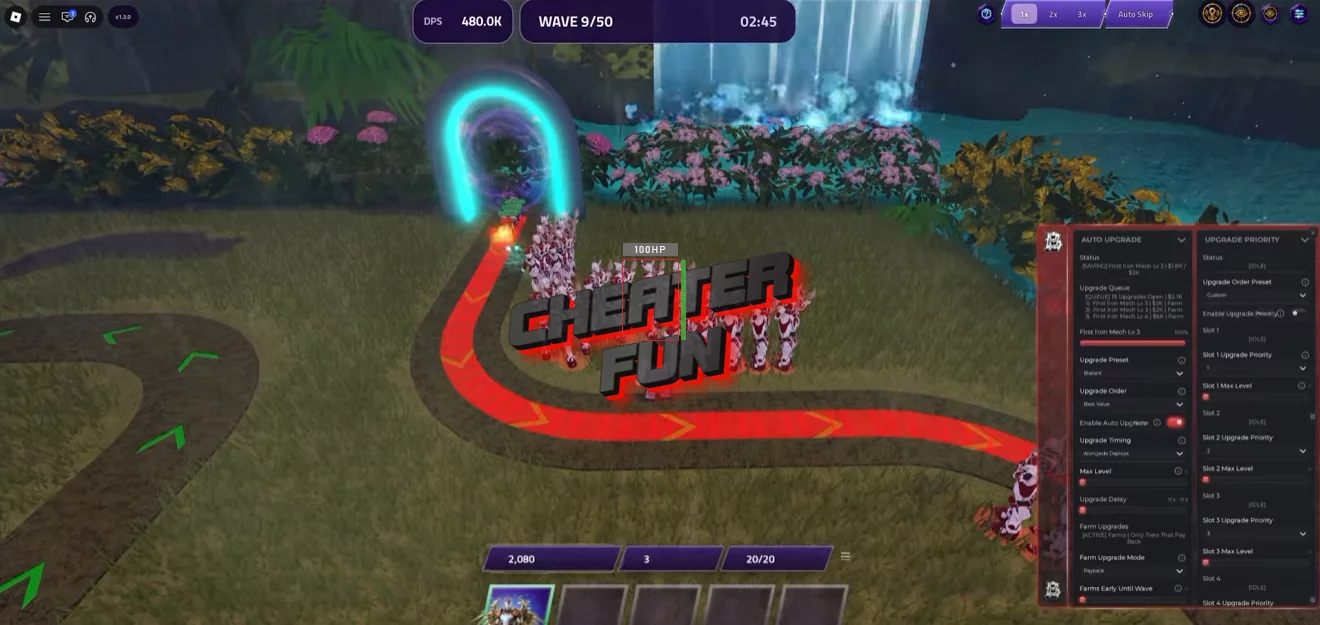
Guardians of Lumina Script provides extensive automation for tower defense gameplay, unit placement, upgrades, farming, summoning, traits, and match management.
Choose from different Auto Play presets, configure intelligent deployment strategies, prioritize targets, and automate upgrades across all eight unit slots. You can also manage your economy with money and currency reserves, automate summons and forging, and claim rewards without handling every task manually.
About Anime Tower Defense: Guardians of Lumina
The year is 2039. Drones have arrived in Florence, and six hubs have already fallen. One last light remains, and it's just awakened. Welcome to Anime Tower Defense: Guardians of Lumina, where anime heroes and powerful mech guardians must stand together against an overwhelming invasion.
Build your defense by deploying units, upgrading their abilities, opening crates, and assembling the strongest possible team. Work with 3–5 players in cooperative battles across a single path, survive ten waves, and face a commander with no one inside.
Anime Tower Defense: Guardians of Lumina Script BarrageHub | AUTO PLAY, AUTO UPGRADE, AUTO ABILITY
loadstring(game:HttpGet("https://barrage.cc/loader"))()Anime Tower Defense: Guardians of Lumina Script Features
⚔️ Auto Play & Farming Presets
Automate complete matches with several predefined strategies and customizable farming options:
Auto Play – Automates gameplay across selected matches.
Big Hitters – Preset focused on high-impact units.
Swarm – Preset for swarm-oriented strategies.
Blatant – Includes a dedicated Blatant preset.
Cheapest First – Prioritizes cheaper units or actions.
Priciest First – Prioritizes the most expensive options.
Smart – Uses a configurable smart selection strategy.
Farms First – Prioritizes farm deployment.
Hold For Top Pick – Waits for the selected top pick before proceeding.
Money Reserve – Keeps a configurable amount of money reserved for future deployments and upgrades.
🛡️ Smart Unit Deployment & Positioning
Control where units are placed and how your defensive formation is organized:
Smart Deploy – Automates unit placement using configurable deployment strategies.
Base Guard – Prioritizes protection of your base.
Hold The Front – Focuses deployment on the front of the path.
Spread Out – Distributes units across available positions.
My Spots – Uses your configured placement locations.
Best Coverage – Prioritizes placement for better path coverage.
Path Start – Selects positions near the beginning of the path.
Path End – Selects positions near the end of the path.
Set Positions – Allows you to configure specific unit positions.
Unit Facing – Controls the direction units face.
Deploy Coverage – Includes deployment coverage settings.
Placement Visuals – Displays visual information for placement locations.
Map Configs – Provides map-specific configuration options.
📈 Auto Upgrade & Farm Management
Automate unit upgrades while configuring the order in which resources are spent:
Auto Upgrade:
Auto Upgrade – Automatically upgrades deployed units.
Carry and Deploy First – Includes a deployment priority option before upgrades.
Best Value – Prioritizes upgrades based on value.
Cheapest First – Purchases the lowest-cost upgrades first.
Highest Damage – Prioritizes upgrades that provide the highest damage.
Max Level – Includes an option to upgrade units to their maximum level.
Farm Upgrades:
Farm Upgrades with Payback – Uses a payback-based approach for prioritizing farm upgrades.
Upgrade Priority for All 8 Slots – Configure upgrade priorities independently across all eight slots.
Deploy Priority – Choose between Highest DPS, Highest Rarity, Longest Range, and No Farms.
Slot Limits – Set deployment limits for available slots.
Top Pick Wait – Configure how long the automation waits for a preferred unit.
🎯 Target Priority
Choose how deployed units prioritize enemies during a match:
Boss Killer – Prioritizes boss enemies.
Leak Safe – Uses a priority strategy focused on preventing enemies from leaking through.
Smart – Automatically selects targets using smart prioritization.
First – Targets enemies closest to the end of the path.
Last – Prioritizes enemies furthest along the opposite end of the path.
Strongest – Targets the strongest enemies.
Weakest – Prioritizes the weakest enemies.
Closest – Targets the nearest enemies.
💰 Auto Sell & Match Management
Auto Sell – Automates unit selling.
Before Boss – Includes an automatic selling option before boss encounters.
Final Wave – Provides a selling option for the final wave.
Match End – Configure what happens when a match finishes:
Replay – Automatically starts another run.
Next Map – Moves to the next map.
Return to Lobby – Returns to the lobby.
Auto Skip – Automates wave skipping.
Hold On Boss – Prevents skipping during boss encounters.
Skip Start Countdown – Automatically skips the starting countdown.
⏩ Game Speed & Auto Join
Customize match speed and automate matchmaking:
Game Speed:
Game Speed – Adjusts the gameplay speed.
Auto Join:
Story – Automatically joins Story Mode.
Endless – Joins Endless Mode.
Challenge – Joins Challenge Mode.
AFK Lounge – Automatically joins the AFK Lounge.
Available Maps:
- Astral Clockwork
- Colosseum
- Enchanted Forest
- Florence
- Halloween 2026
Difficulty Selection:
- Easy
- Medium
- Hard
- Very Hard
- Nightmare
Lobby Options:
- Solo Lobby
- Friends Only
✨ Auto Ability & Self Combat
Automate abilities and configure additional combat actions:
Auto Ability:
Auto Ability – Automates ability usage.
Boss Killer – Includes boss-focused ability rules.
Big Waves – Configures ability usage for large enemy waves.
Smart Rules – Uses configurable rules for ability activation.
Hotbar Abilities – Supports abilities assigned to the hotbar.
Self Combat:
Self Combat – Includes automated player combat options.
Self Ability – Automates the use of your own abilities.
Self Attack – Automates your own attacks.
🎁 Auto Summon & Unit Management
Automate summoning while controlling how many units you obtain:
Auto Summon – Automates unit summoning.
Multi – Uses multi-summoning.
Single – Performs individual summons.
Credit Reserve – Keeps a configurable amount of credits reserved.
Auto Sell Summons – Automates selling summoned units.
Keep Rare – Preserves units of Rare or higher rarity.
Elite or Apex Up – Includes an additional rarity threshold for keeping summoned units.
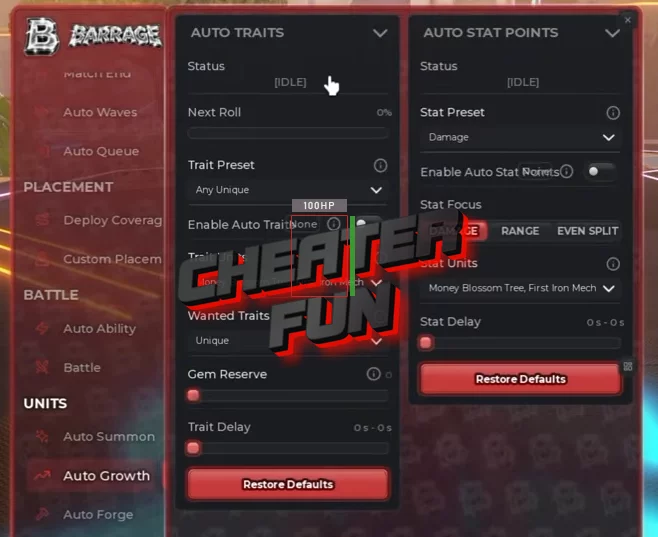
🧬 Auto Traits & Stat Points
Customize unit traits and character progression:
Auto Traits:
Damage – Prioritizes damage-related traits.
Range – Prioritizes range.
Cooldown – Prioritizes cooldown-related traits.
Income – Prioritizes income bonuses.
Unique – Includes unique trait selection.
Additional Progression:
Gem Reserve – Keeps a configurable amount of gems reserved.
Auto Stat Points – Automatically handles available stat point allocation.
⚒️ Auto Forge & Mythic Hunting
Auto Forge – Automates forging activities.
Grail Hunt – Includes a dedicated Grail Hunt option.
Mythic Or Better – Provides a rarity threshold for forging targets.
Auto Self Forge – Automates self-forging activities.

0 comments
Information
Users of Guests are not allowed to comment this publication.
If you have a problem, write to us.